

How to Remove a User
How to Remove a User
As a security administrator, when an employee leaves your company, you must ensure that the user can no longer access your systems. Remove unused user IDs to keep your company resources secure.
In CA Chorus, a backend external security manager (ESM) controls user access rights. The ESM can be CA Top Secret® for z/OS (CA Top Secret) or CA ACF2™ for z/OS (CA ACF2). Use CA Chorus for Security and Compliance Management to manage users on CA Chorus.
You can remove a user in two ways:
- Suspend the user
-
Deactivate but do not delete the user ID from the ESM.
- Delete the user
-
Delete the user ID and all related entitlements from the ESM.
As a best practice, we recommend that you first suspend the user and later optionally delete the user.
Important! Review your site removal policies before you delete a user. Improper deletion can result in security or legal issues.
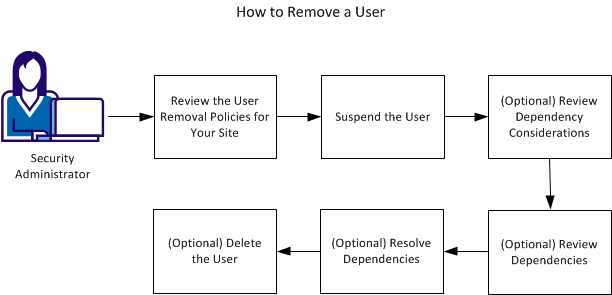
To remove a user:
- Review the User Removal Policies for Your Site.
- Suspend the User.
- (Optional) Review Dependency Considerations in one of the following ways:
- Review Dependencies (CA ACF2)
- Review Dependencies (CA Top Secret)
- (Optional) Review Dependencies.
- (Optional) Resolve Dependencies.
- (Optional) Delete the User.
Prerequisites
The following access and privileges are required to remove a user:
- Access to the CA Chorus Security and Compliance Management discipline
- In CA ACF2, security administrators must have the ACCOUNT or SECURITY privilege to delete logonids.
- In CA Top Secret:
- To delete ACIDs, security administrators must have ACID(CREATE|ALL) authority for ACIDs within their scope.
- To suspend ACIDs, security administrators must have MISC1(SUSPEND) authority. Security administrators who do not have MISC1(SUSPEND) authority can still suspend ACIDs within their scope. To do so, they must have UPDATE access to entity TSSCMD.USER.ADDTO.SUSPEND in the CASECAUT resource class.
Copyright © 2013 CA Technologies.
All rights reserved.
|
|